
Description
HP M290 Wireless Mouse – A Smart Alternative to Logitech MX Master
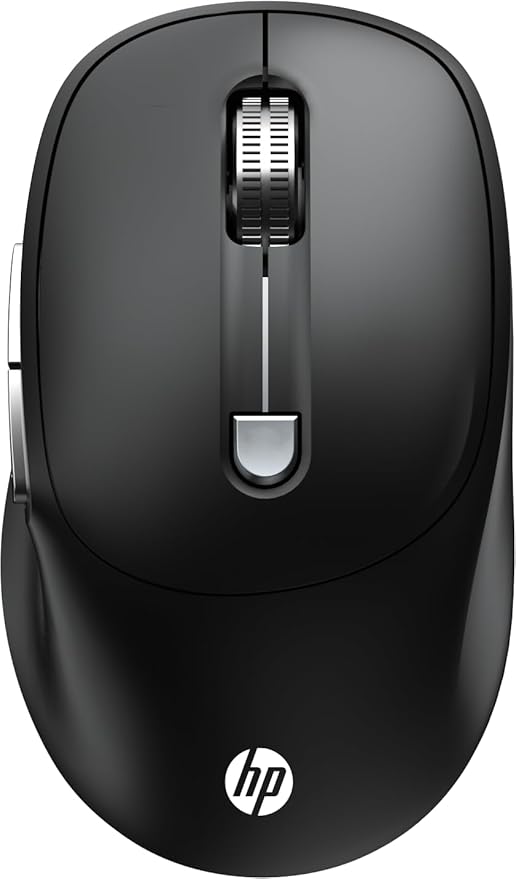
The Logitech MX Master series is widely considered the gold standard for productivity mice, with its ergonomic shape and advanced customization. But not everyone needs—or wants to pay for—a premium productivity mouse. That’s where the HP M290 Wireless Mouse (AB3C7AA) comes in: a cost-effective, full-size, and versatile mouse that covers everyday needs while still delivering performance features like 3200 DPI sensitivity, silent clicks, and a 6-button design.
Whether you’re working, studying, or playing casual games, the HP M290 offers a smooth and reliable wireless experience at a fraction of the cost of the Logitech MX Master.
🔥 Key Features
🖱️ Click Quietly
-
Reduces click noise by up to 90% on left and right buttons
-
Same tactile feel without disturbing others
-
Perfect for shared workspaces, libraries, or late-night use
🎯 Precision with 3200 DPI
-
Adjustable DPI up to 3200 for accurate and responsive tracking
-
Great for productivity tasks and casual gameplay
-
Smooth navigation across different screen sizes
⚡ 6 Functional Buttons
-
Standard left/right click + middle scroll
-
3D metal scroll wheel for durable, smooth scrolling
-
DPI switch button for quick sensitivity adjustments
-
Additional side buttons for workflow shortcuts
🖐️ Full-Size Ambidextrous Design
-
Comfortable for both right- and left-handed users
-
Designed for all-day use without strain
-
Plug-and-play simplicity – no extra setup needed
🔋 Reliable Wireless Performance
-
Stable connectivity for hassle-free work sessions
-
Perfect companion for laptops, desktops, and hybrid setups
🆚 HP M290 vs Logitech MX Master
The Logitech MX Master is a premium ergonomic mouse with advanced features like gesture controls, horizontal scrolling, and multi-device pairing. It’s built for power users.
The HP M290, however, is designed as a practical everyday mouse with:
-
✅ Silent clicks (great for office or study use)
-
✅ 3200 DPI for responsive tracking
-
✅ 6 functional buttons for workflow efficiency
-
✅ Ambidextrous design (MX Master is right-hand only)
-
✅ Lightweight & budget-friendly
If you don’t need the advanced productivity suite of the MX Master, the HP M290 is an affordable alternative that covers most daily tasks.
🏆 Benefits of Choosing HP M290
-
✅ Save money vs premium options like Logitech MX Master
-
✅ Quiet operation—ideal for shared or silent spaces
-
✅ Smooth performance with 3200 DPI
-
✅ Comfortable for both right- and left-handed users
-
✅ Multi-button layout enhances productivity
⚙️ Specifications
-
Brand: HP
-
Model: M290 Wireless Mouse (AB3C7AA)
-
DPI: Up to 3200
-
Buttons: 6 (including DPI switch & metal scroll wheel)
-
Design: Full-size ambidextrous
-
Click Noise Reduction: Up to 90%
-
Connectivity: Wireless (plug-and-play)
🎉 Conclusion
If you’re looking for a budget-friendly wireless mouse with strong productivity features, the HP M290 is a solid choice. While the Logitech MX Master caters to professionals who want advanced controls, the HP M290 offers a quiet, responsive, and comfortable alternative with 3200 DPI tracking, 6 buttons, and an ambidextrous design—all at a much more affordable price point.
Whether for office work, studying, or casual use, the HP M290 Wireless Mouse is a practical alternative to the Logitech MX Master.
🏆 Target SEO Keywords
-
Logitech MX Master alternative
-
HP M290 Wireless Mouse review
-
Best silent click wireless mouse
-
Budget productivity mouse
-
Ambidextrous wireless mouse
HP M290 Wireless Mouse – A Smart Alternative to Logitech MX Master
The Logitech MX Master series is widely considered the gold standard for productivity mice, with its ergonomic shape and advanced customization. But not everyone needs—or wants to pay for—a premium productivity mouse. That’s where the HP M290 Wireless Mouse (AB3C7AA) comes in: a cost-effective, full-size, and versatile mouse that covers everyday needs while still delivering performance features like 3200 DPI sensitivity, silent clicks, and a 6-button design.
Whether you’re working, studying, or playing casual games, the HP M290 offers a smooth and reliable wireless experience at a fraction of the cost of the Logitech MX Master.
🔥 Key Features
🖱️ Click Quietly
-
Reduces click noise by up to 90% on left and right buttons
-
Same tactile feel without disturbing others
-
Perfect for shared workspaces, libraries, or late-night use
🎯 Precision with 3200 DPI
-
Adjustable DPI up to 3200 for accurate and responsive tracking
-
Great for productivity tasks and casual gameplay
-
Smooth navigation across different screen sizes
⚡ 6 Functional Buttons
-
Standard left/right click + middle scroll
-
3D metal scroll wheel for durable, smooth scrolling
-
DPI switch button for quick sensitivity adjustments
-
Additional side buttons for workflow shortcuts
🖐️ Full-Size Ambidextrous Design
-
Comfortable for both right- and left-handed users
-
Designed for all-day use without strain
-
Plug-and-play simplicity – no extra setup needed
🔋 Reliable Wireless Performance
-
Stable connectivity for hassle-free work sessions
-
Perfect companion for laptops, desktops, and hybrid setups
🆚 HP M290 vs Logitech MX Master
The Logitech MX Master is a premium ergonomic mouse with advanced features like gesture controls, horizontal scrolling, and multi-device pairing. It’s built for power users.
The HP M290, however, is designed as a practical everyday mouse with:
-
✅ Silent clicks (great for office or study use)
-
✅ 3200 DPI for responsive tracking
-
✅ 6 functional buttons for workflow efficiency
-
✅ Ambidextrous design (MX Master is right-hand only)
-
✅ Lightweight & budget-friendly
If you don’t need the advanced productivity suite of the MX Master, the HP M290 is an affordable alternative that covers most daily tasks.
🏆 Benefits of Choosing HP M290
-
✅ Save money vs premium options like Logitech MX Master
-
✅ Quiet operation—ideal for shared or silent spaces
-
✅ Smooth performance with 3200 DPI
-
✅ Comfortable for both right- and left-handed users
-
✅ Multi-button layout enhances productivity
⚙️ Specifications
-
Brand: HP
-
Model: M290 Wireless Mouse (AB3C7AA)
-
DPI: Up to 3200
-
Buttons: 6 (including DPI switch & metal scroll wheel)
-
Design: Full-size ambidextrous
-
Click Noise Reduction: Up to 90%
-
Connectivity: Wireless (plug-and-play)
🎉 Conclusion
If you’re looking for a budget-friendly wireless mouse with strong productivity features, the HP M290 is a solid choice. While the Logitech MX Master caters to professionals who want advanced controls, the HP M290 offers a quiet, responsive, and comfortable alternative with 3200 DPI tracking, 6 buttons, and an ambidextrous design—all at a much more affordable price point.
Whether for office work, studying, or casual use, the HP M290 Wireless Mouse is a practical alternative to the Logitech MX Master.
🏆 Target SEO Keywords
-
Logitech MX Master alternative
-
HP M290 Wireless Mouse review
-
Best silent click wireless mouse
-
Budget productivity mouse
-
Ambidextrous wireless mouse
HP M290 Wireless Mouse – A Smart Alternative to Logitech MX Master
The Logitech MX Master series is widely considered the gold standard for productivity mice, with its ergonomic shape and advanced customization. But not everyone needs—or wants to pay for—a premium productivity mouse. That’s where the HP M290 Wireless Mouse (AB3C7AA) comes in: a cost-effective, full-size, and versatile mouse that covers everyday needs while still delivering performance features like 3200 DPI sensitivity, silent clicks, and a 6-button design.
Whether you’re working, studying, or playing casual games, the HP M290 offers a smooth and reliable wireless experience at a fraction of the cost of the Logitech MX Master.
🔥 Key Features
🖱️ Click Quietly
-
Reduces click noise by up to 90% on left and right buttons
-
Same tactile feel without disturbing others
-
Perfect for shared workspaces, libraries, or late-night use
🎯 Precision with 3200 DPI
-
Adjustable DPI up to 3200 for accurate and responsive tracking
-
Great for productivity tasks and casual gameplay
-
Smooth navigation across different screen sizes
⚡ 6 Functional Buttons
-
Standard left/right click + middle scroll
-
3D metal scroll wheel for durable, smooth scrolling
-
DPI switch button for quick sensitivity adjustments
-
Additional side buttons for workflow shortcuts
🖐️ Full-Size Ambidextrous Design
-
Comfortable for both right- and left-handed users
-
Designed for all-day use without strain
-
Plug-and-play simplicity – no extra setup needed
🔋 Reliable Wireless Performance
-
Stable connectivity for hassle-free work sessions
-
Perfect companion for laptops, desktops, and hybrid setups
🆚 HP M290 vs Logitech MX Master
The Logitech MX Master is a premium ergonomic mouse with advanced features like gesture controls, horizontal scrolling, and multi-device pairing. It’s built for power users.
The HP M290, however, is designed as a practical everyday mouse with:
-
✅ Silent clicks (great for office or study use)
-
✅ 3200 DPI for responsive tracking
-
✅ 6 functional buttons for workflow efficiency
-
✅ Ambidextrous design (MX Master is right-hand only)
-
✅ Lightweight & budget-friendly
If you don’t need the advanced productivity suite of the MX Master, the HP M290 is an affordable alternative that covers most daily tasks.
🏆 Benefits of Choosing HP M290
-
✅ Save money vs premium options like Logitech MX Master
-
✅ Quiet operation—ideal for shared or silent spaces
-
✅ Smooth performance with 3200 DPI
-
✅ Comfortable for both right- and left-handed users
-
✅ Multi-button layout enhances productivity
⚙️ Specifications
-
Brand: HP
-
Model: M290 Wireless Mouse (AB3C7AA)
-
DPI: Up to 3200
-
Buttons: 6 (including DPI switch & metal scroll wheel)
-
Design: Full-size ambidextrous
-
Click Noise Reduction: Up to 90%
-
Connectivity: Wireless (plug-and-play)
🎉 Conclusion
If you’re looking for a budget-friendly wireless mouse with strong productivity features, the HP M290 is a solid choice. While the Logitech MX Master caters to professionals who want advanced controls, the HP M290 offers a quiet, responsive, and comfortable alternative with 3200 DPI tracking, 6 buttons, and an ambidextrous design—all at a much more affordable price point.
Whether for office work, studying, or casual use, the HP M290 Wireless Mouse is a practical alternative to the Logitech MX Master.
🏆 Target SEO Keywords
-
Logitech MX Master alternative
-
HP M290 Wireless Mouse review
-
Best silent click wireless mouse
-
Budget productivity mouse
-
Ambidextrous wireless mouse
HP M290 Wireless Mouse – A Smart Alternative to Logitech MX Master
The Logitech MX Master series is widely considered the gold standard for productivity mice, with its ergonomic shape and advanced customization. But not everyone needs—or wants to pay for—a premium productivity mouse. That’s where the HP M290 Wireless Mouse (AB3C7AA) comes in: a cost-effective, full-size, and versatile mouse that covers everyday needs while still delivering performance features like 3200 DPI sensitivity, silent clicks, and a 6-button design.
Whether you’re working, studying, or playing casual games, the HP M290 offers a smooth and reliable wireless experience at a fraction of the cost of the Logitech MX Master.
🔥 Key Features
🖱️ Click Quietly
-
Reduces click noise by up to 90% on left and right buttons
-
Same tactile feel without disturbing others
-
Perfect for shared workspaces, libraries, or late-night use
🎯 Precision with 3200 DPI
-
Adjustable DPI up to 3200 for accurate and responsive tracking
-
Great for productivity tasks and casual gameplay
-
Smooth navigation across different screen sizes
⚡ 6 Functional Buttons
-
Standard left/right click + middle scroll
-
3D metal scroll wheel for durable, smooth scrolling
-
DPI switch button for quick sensitivity adjustments
-
Additional side buttons for workflow shortcuts
🖐️ Full-Size Ambidextrous Design
-
Comfortable for both right- and left-handed users
-
Designed for all-day use without strain
-
Plug-and-play simplicity – no extra setup needed
🔋 Reliable Wireless Performance
-
Stable connectivity for hassle-free work sessions
-
Perfect companion for laptops, desktops, and hybrid setups
🆚 HP M290 vs Logitech MX Master
The Logitech MX Master is a premium ergonomic mouse with advanced features like gesture controls, horizontal scrolling, and multi-device pairing. It’s built for power users.
The HP M290, however, is designed as a practical everyday mouse with:
-
✅ Silent clicks (great for office or study use)
-
✅ 3200 DPI for responsive tracking
-
✅ 6 functional buttons for workflow efficiency
-
✅ Ambidextrous design (MX Master is right-hand only)
-
✅ Lightweight & budget-friendly
If you don’t need the advanced productivity suite of the MX Master, the HP M290 is an affordable alternative that covers most daily tasks.
🏆 Benefits of Choosing HP M290
-
✅ Save money vs premium options like Logitech MX Master
-
✅ Quiet operation—ideal for shared or silent spaces
-
✅ Smooth performance with 3200 DPI
-
✅ Comfortable for both right- and left-handed users
-
✅ Multi-button layout enhances productivity
⚙️ Specifications
-
Brand: HP
-
Model: M290 Wireless Mouse (AB3C7AA)
-
DPI: Up to 3200
-
Buttons: 6 (including DPI switch & metal scroll wheel)
-
Design: Full-size ambidextrous
-
Click Noise Reduction: Up to 90%
-
Connectivity: Wireless (plug-and-play)
🎉 Conclusion
If you’re looking for a budget-friendly wireless mouse with strong productivity features, the HP M290 is a solid choice. While the Logitech MX Master caters to professionals who want advanced controls, the HP M290 offers a quiet, responsive, and comfortable alternative with 3200 DPI tracking, 6 buttons, and an ambidextrous design—all at a much more affordable price point.
Whether for office work, studying, or casual use, the HP M290 Wireless Mouse is a practical alternative to the Logitech MX Master.
🏆 Target SEO Keywords
-
Logitech MX Master alternative
-
HP M290 Wireless Mouse review
-
Best silent click wireless mouse
-
Budget productivity mouse
-
Ambidextrous wireless mouse
HP M290 Wireless Mouse – A Smart Alternative to Logitech MX Master
The Logitech MX Master series is widely considered the gold standard for productivity mice, with its ergonomic shape and advanced customization. But not everyone needs—or wants to pay for—a premium productivity mouse. That’s where the HP M290 Wireless Mouse (AB3C7AA) comes in: a cost-effective, full-size, and versatile mouse that covers everyday needs while still delivering performance features like 3200 DPI sensitivity, silent clicks, and a 6-button design.
Whether you’re working, studying, or playing casual games, the HP M290 offers a smooth and reliable wireless experience at a fraction of the cost of the Logitech MX Master.
🔥 Key Features
🖱️ Click Quietly
-
Reduces click noise by up to 90% on left and right buttons
-
Same tactile feel without disturbing others
-
Perfect for shared workspaces, libraries, or late-night use
🎯 Precision with 3200 DPI
-
Adjustable DPI up to 3200 for accurate and responsive tracking
-
Great for productivity tasks and casual gameplay
-
Smooth navigation across different screen sizes
⚡ 6 Functional Buttons
-
Standard left/right click + middle scroll
-
3D metal scroll wheel for durable, smooth scrolling
-
DPI switch button for quick sensitivity adjustments
-
Additional side buttons for workflow shortcuts
🖐️ Full-Size Ambidextrous Design
-
Comfortable for both right- and left-handed users
-
Designed for all-day use without strain
-
Plug-and-play simplicity – no extra setup needed
🔋 Reliable Wireless Performance
-
Stable connectivity for hassle-free work sessions
-
Perfect companion for laptops, desktops, and hybrid setups
🆚 HP M290 vs Logitech MX Master
The Logitech MX Master is a premium ergonomic mouse with advanced features like gesture controls, horizontal scrolling, and multi-device pairing. It’s built for power users.
The HP M290, however, is designed as a practical everyday mouse with:
-
✅ Silent clicks (great for office or study use)
-
✅ 3200 DPI for responsive tracking
-
✅ 6 functional buttons for workflow efficiency
-
✅ Ambidextrous design (MX Master is right-hand only)
-
✅ Lightweight & budget-friendly
If you don’t need the advanced productivity suite of the MX Master, the HP M290 is an affordable alternative that covers most daily tasks.
🏆 Benefits of Choosing HP M290
-
✅ Save money vs premium options like Logitech MX Master
-
✅ Quiet operation—ideal for shared or silent spaces
-
✅ Smooth performance with 3200 DPI
-
✅ Comfortable for both right- and left-handed users
-
✅ Multi-button layout enhances productivity
⚙️ Specifications
-
Brand: HP
-
Model: M290 Wireless Mouse (AB3C7AA)
-
DPI: Up to 3200
-
Buttons: 6 (including DPI switch & metal scroll wheel)
-
Design: Full-size ambidextrous
-
Click Noise Reduction: Up to 90%
-
Connectivity: Wireless (plug-and-play)
🎉 Conclusion
If you’re looking for a budget-friendly wireless mouse with strong productivity features, the HP M290 is a solid choice. While the Logitech MX Master caters to professionals who want advanced controls, the HP M290 offers a quiet, responsive, and comfortable alternative with 3200 DPI tracking, 6 buttons, and an ambidextrous design—all at a much more affordable price point.
Whether for office work, studying, or casual use, the HP M290 Wireless Mouse is a practical alternative to the Logitech MX Master.
🏆 Target SEO Keywords
-
Logitech MX Master alternative
-
HP M290 Wireless Mouse review
-
Best silent click wireless mouse
-
Budget productivity mouse
-
Ambidextrous wireless mouse
-
-
-
-
Reviews
There are no reviews yet.